

Ever abandoned a checkout because it took just one extra click? You’re not alone—nearly 70% of online shopping carts are abandoned, often due to poor user experience, highlighting just how powerful thoughtful design can be. Starting a career in UI UX design can feel like navigating a vibrant, yet complex, digital city, where every pixel, interaction, and user journey is a deliberate decision that shapes how millions engage with technology. It goes far beyond aesthetics; it’s about understanding human behavior, reducing friction, and creating meaningful, intuitive experiences that solve real problems and seamlessly fit into everyday life.
Unpacking UI and UX: More Than Just Acronyms
Before diving deep, let’s clarify the fundamental concepts. While often grouped, User Interface (UI) and User Experience (UX) design are distinct yet interdependent disciplines.
User Experience (UX) Design: The Science of Satisfaction
UX design is the overarching discipline focused on making products useful, usable, and enjoyable. It’s about understanding the user’s needs, motivations, and behaviors to create a seamless and meaningful interaction. A UX designer’s primary goal is to ensure that a product solves a problem effectively and provides a positive experience from start to finish.
This comes down to how efficiently something works for the user. For example, an e-commerce website should allow customers to search products easily, filter options, and complete purchases without unnecessary steps. Similarly, a training institute website should clearly present course details, fees, and enrollment options so visitors can take action quickly. In both cases, the focus is on usability, clarity, and achieving the intended goal without friction.
Key aspects of UX design include:
- User Research: Conducting interviews, surveys, usability tests, and analyzing data to understand target users and their needs. This foundational step informs every subsequent design decision.
- Information Architecture (IA): Organizing and structuring content in a clear, logical, and accessible way. This involves creating sitemaps, user flows, and navigation systems.
- Interaction Design (IxD): Focusing on how users interact with a product. This includes considering gestures, animations, feedback mechanisms, and overall responsiveness.
- Usability Testing: Evaluating a product with real users to identify pain points and areas for improvement. This iterative process is crucial for refining the design.
- Wireframing and Prototyping: Creating low-fidelity representations (wireframes) and interactive models (prototypes) to visualize and test design concepts early in the process.
User Interface (UI) Design: The Art of Engagement
UX design focuses on how a product works and how users navigate it, ensuring tasks are simple and efficient, while UI design deals with the visual and interactive elements like layout, colors, and buttons that make the experience engaging and easy to use. UI designers are responsible for the look, feel, and interactivity of the product. They translate the insights gathered by UX designers into tangible, aesthetically pleasing, and intuitive interfaces.
Core components of UI design include:
- Visual Design: Selecting color palettes, typography, imagery, and iconography to create a cohesive and appealing aesthetic that aligns with brand identity.
- Layout and Grids: Arranging elements on a screen in an organized and visually balanced manner to guide the user’s eye and improve readability.
- Component Design: Creating individual interactive elements like buttons, forms, sliders, and menus, ensuring they are consistent, accessible, and responsive.
- Branding and Style Guides: Developing and maintaining design systems that ensure consistency across all product touchpoints, making the brand recognizable and predictable.
- Animation and Micro-interactions: Designing subtle movements and feedback mechanisms that enhance usability and add personality to the interface.
In essence, UX design makes a product functional and enjoyable, while UI design makes it beautiful and easy to interact with. Both are indispensable for creating successful digital products.
Essential Skills for Aspiring UI/UX Designer
To truly master UI/UX design, you’ll need a robust toolkit of both technical and soft skills. These are not learned overnight but developed through practice, patience, and continuous learning.
Technical Skills: The Tools of the Trade
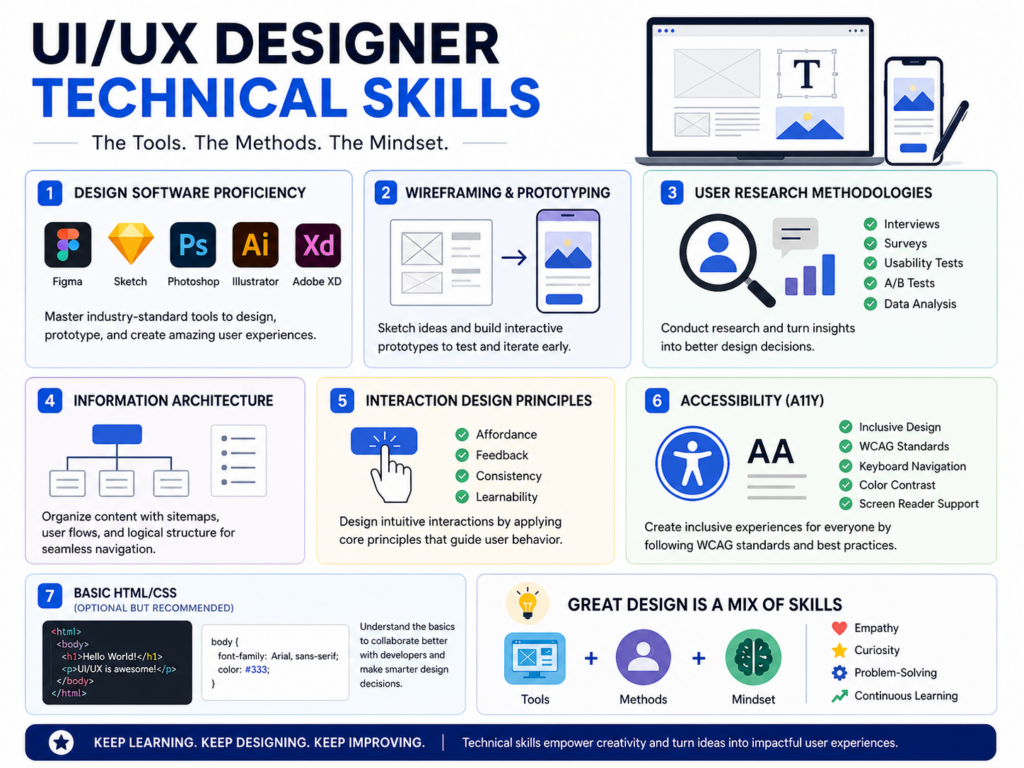
- Design Software Proficiency: Familiarity with industry-standard tools is non-negotiable. Key software includes:
- Figma: A powerful, collaborative, browser-based tool for UI design, wireframing, prototyping, and design systems. It’s become a cornerstone for many teams.
- Sketch: A vector-based design tool primarily for UI and icon design (Mac-only).
- Adobe Photoshop/Illustrator: Essential for image manipulation, creating custom graphics, and refining visual assets.
- Adobe XD: Part of the Adobe Creative Suite, offering robust features for UI UX design, prototyping, and collaboration.
- Wireframing and Prototyping: The ability to quickly sketch out ideas (low-fidelity wireframes) and build interactive models (high-fidelity prototypes) is crucial for testing and iterating designs before development.
- User Research Methodologies: Understanding how to conduct surveys, interviews, usability tests, A/B tests, and analyze the data to extract actionable insights.
- Information Architecture: Skills in creating sitemaps, user flows, and understanding how to structure content logically for optimal user navigation.
- Interaction Design Principles: Knowledge of how users interact with digital interfaces, including principles like affordance, feedback, consistency, and learnability.
- Accessibility (A11y): Designing products that are usable by people with diverse abilities, adhering to standards like WCAG. This is not just good practice but often a legal requirement.
- Basic HTML/CSS (Optional but Recommended): While not strictly required for all UI UX design roles, a basic understanding of front-end development can greatly improve communication with developers and inform design decisions.
Soft Skills: The Foundation of Great Design
- Empathy: The ability to understand and share the feelings of users is one of the most critical UI UX design skills. It goes beyond basic observation—designers actively practice empathy when synthesizing user interview data to uncover latent needs that users may not explicitly express. For example, during usability testing for a healthcare app, users might say they feel “confused,” but empathetic analysis can reveal deeper concerns like anxiety about making mistakes. This insight helps designers create reassuring interfaces with clear guidance, reducing user stress and improving overall experience.
- Problem-Solving: UI UX design is fundamentally about solving user and business problems. Designers must identify pain points, ideate solutions, and test their effectiveness. A practical example is solving the challenge of information overload on a financial dashboard. Instead of displaying all data at once, a designer might introduce progressive disclosure, intuitive data grouping, and visual hierarchy to help users focus on key insights. This structured approach transforms a cluttered interface into a user-friendly, decision-making tool.
- Communication: Strong communication ensures that design ideas are understood and implemented effectively across teams. Designers often need to communicate complex design decisions to stakeholders with varying levels of technical knowledge. For instance, when presenting a redesign to a non-technical executive board, a UI UX Designer must translate design choices into business value—such as explaining how simplifying a checkout flow can reduce cart abandonment and increase revenue—using clear visuals, storytelling, and data-backed reasoning.
- Critical Thinking: Analyzing complex information, evaluating design choices, and making informed decisions based on data and user feedback.
- Creativity: While design is systematic, it also requires innovative thinking to devise novel and effective solutions.
- Adaptability: The design landscape is constantly evolving. Designers must be open to new tools, methodologies, and feedback, and be willing to iterate and pivot.
- Attention to Detail: From pixel-perfect UI elements to the subtle nuances of user interaction, meticulous attention to detail elevates good design to great design.
The UI/UX Design Process: A Structured Approach
Great design isn’t accidental; it’s the result of a systematic, iterative process. While specific steps may vary, the core phases remain consistent:
- Discovery & Research: This is where you understand the problem. Conduct user interviews, surveys, competitive analysis, and stakeholder interviews. Define the target audience, their needs, pain points, and existing solutions. Create user personas and journey maps.
- Define & Ideate: Synthesize the research findings to clearly define the problem you’re trying to solve. Brainstorm a wide range of potential solutions without judgment. Techniques like sketching, mind mapping, and user story mapping are common here.
- Design & Prototype: Based on the defined problem and ideated solutions, start creating visual representations. Begin with low-fidelity wireframes to establish layout and functionality, then progress to higher-fidelity prototypes that are interactive and visually refined. This is where UI design principles come heavily into play.
- Test & Iterate: Put your prototypes in front of real users. Conduct usability testing to observe how users interact with your design, identify areas of confusion or difficulty, and gather feedback. Based on these insights, refine and iterate your design. This cycle of design-test-iterate is continuous until the product meets user needs and business goals.
- Implementation & Launch: Once the design is validated, work closely with developers to ensure the final product accurately reflects the design vision. Provide clear specifications, assets, and ongoing support. After launch, continue to monitor user feedback and analytics for further improvements.
Building Your First UI/UX Portfolio: Your Design Story
For beginners, a strong portfolio is your most powerful tool. It’s not just a collection of projects; it’s a narrative showcasing your design process, problem-solving abilities, and how you think. Aim for quality over quantity.
What to Include:
- Case Studies: For each project, don’t just show the final product. Detail the problem, your role, the research conducted, your design process (wireframes, prototypes, iterations), the challenges faced, your solutions, and the impact or lessons learned. This demonstrates your UX thinking.
- Visuals: High-quality screenshots, interactive prototypes, and animations of your UI work. Clearly highlight your UI design skills.
- Variety: Include a mix of projects (mobile app, website, dashboard) if possible to show versatility.
- Personal Projects: If you don’t have client work, create speculative projects based on real-world problems or redesign existing apps/websites. This shows initiative.
Tips for Beginners:
- Start Small: Don’t try to redesign Facebook. Pick a small, focused problem you care about.
- Document Everything: Keep notes, sketches, and iterations from the very beginning of a project.
- Get Feedback: Share your work with peers, mentors, or online communities for constructive criticism.
- Tell a Story: Your portfolio should guide the viewer through your thought process for each project.
Navigating Learning Paths: Your Journey to Expertise
There are numerous ways to acquire UI UX design skills. Choosing the right path depends on your learning style, budget, and career goals.
Self-Study
- Pros: Flexible, affordable (often free resources), self-paced.
- Cons: Requires high self-discipline, can lack structured feedback, difficult to know where to start or if you’re learning the right things.
- Resources: Free online courses (Coursera, edX, Google UI UX Design Certificate), YouTube tutorials, design blogs (Nielsen Norman Group, Smashing Magazine), books, and community forums.
Online Courses & Bootcamps
- Pros: Structured curriculum, expert instructors, peer collaboration, portfolio-building projects, career support.
- Cons: Can be expensive, intensive time commitment.
- Example: For those in Chennai looking for quality, affordable education, Login 360 offers comprehensive IT training programs, including specialized courses in UI UX design. Their focus on accessibility ensures that aspiring designers can gain industry-relevant skills without financial barriers, making a professional career in UI UX design attainable. They provide hands-on training, mentorship, and practical projects to build a strong portfolio, addressing the immediate needs of beginners seeking a structured learning environment.
Formal Education (Degrees)
- Pros: Comprehensive theoretical foundation, extensive networking opportunities, recognized credentials.
- Cons: Longest duration, most expensive.
- Focus: Often broader design principles, human-computer interaction, cognitive psychology.
Career Paths and Specializations in UI/UX Design
The field of UI/UX is broad, offering various specializations as you gain experience:
- UX Designer: Focuses on research, information architecture, and overall user experience.
- UI Designer: Specializes in visual design, branding, and interactive elements.
- Product Designer: A hybrid role encompassing both UX and UI, often involved in product strategy and development from conception to launch.
- UX Researcher: Deep dives into user behavior, conducting extensive studies and analysis.
- Interaction Designer (IxD): Concentrates on how users interact with the interface, designing animations and micro-interactions.
- Service Designer: Designs the entire end-to-end service experience, which might include digital and physical touchpoints.
- Content Strategist/UX Writer: Focuses on the language and tone within the user interface, ensuring clarity and consistency.
Networking and Continuous Growth
The UI/UX community is incredibly supportive. Engaging with it is crucial for learning, finding opportunities, and staying motivated.
- Online Communities: Join LinkedIn groups, Reddit communities (r/UXDesign), Discord servers, and Behance/Dribbble for inspiration and feedback.
- Local Meetups: Attend local design meetups, workshops, and conferences. For those in Chennai, actively seeking out local design events can provide invaluable in-person networking opportunities.
- Mentorship: Seek out experienced designers who can offer guidance and feedback on your work and career path.
- Stay Updated: The industry evolves rapidly. Read design blogs, listen to podcasts, and experiment with new tools and methodologies regularly.
Conclusion: Your Journey Starts Now
UI UX design is more than just creating interfaces—it’s about shaping how people experience the digital world. As you begin your journey, remember that great designers don’t just solve problems they question them. The future of design lies in creating more human, ethical, and intuitive experiences. So here’s your challenge: pick one app you use daily and redesign a single feature to make it better for real users.
That one step could be the start of your design identity.
Remember, every great designer started as a beginner. With resources like Login 360 in Coimbatore providing accessible and high-quality training, you have the support to transform your passion into a profession. Dive in, design with purpose, and shape the digital experiences of tomorrow.