

What if the fastest-growing careers in IT had nothing to do with coding at all?
You can pick the tone you like statistical, storytelling, or provocative and place it right above your content to instantly grab attention. This comprehensive guide from Login360, Chennai’s leading affordable IT training institute, will unveil the vast opportunities in non coding IT jobs and provide a clear roadmap for beginners to thrive.
The digital transformation across industries has created a plethora of specialized roles that don’t require a single line of code. These positions are crucial for bridging the gap between technical development and business needs, ensuring smooth operations, effective project management, and user-centric solutions. If you’re looking to enter the dynamic IT sector but prefer not to code, 2026 is an opportune moment to explore these high-demand professions.
Why Non Coding IT Jobs Roles Are Booming
The rapid expansion of non coding IT jobs roles is backed by clear industry trends and real-world examples. As technology becomes deeply embedded across sectors, companies increasingly need professionals who can implement and manage systems rather than build them from scratch. For instance, the healthcare industry especially hospitals using platforms like Epic Systems relies heavily on IT analysts and administrators to configure electronic health records, ensure compliance, and optimize workflows without writing code.
Organizations such as Accenture and Deloitte actively hire business analysts, project managers, and QA specialists to bridge the gap between business needs and technical teams. These roles are critical in translating requirements into actionable solutions, ensuring projects stay aligned with business goals.
The rise of low-code/no-code platforms has further accelerated this trend. Companies like Microsoft (with Power Apps) and Salesforce (with Lightning Platform) enable non-developers to build applications through visual interfaces. A report by Gartner predicts that over 70% of new enterprise applications will use low-code or no-code technologies by 2025, highlighting a major shift in how software is created.
Additionally, the growing complexity of IT ecosystems cloud computing, cybersecurity, and data analytics demands specialized non-coding roles. For example, cloud platforms like Amazon Web Services require cloud architects, support engineers, and operations managers who focus on deployment, monitoring, and cost optimization rather than coding.
In summary, the boom in non coding IT jobs is not just a trend but a structural shift driven by digital transformation, platform evolution, and the increasing need for roles centered on coordination, analysis, and user experience.
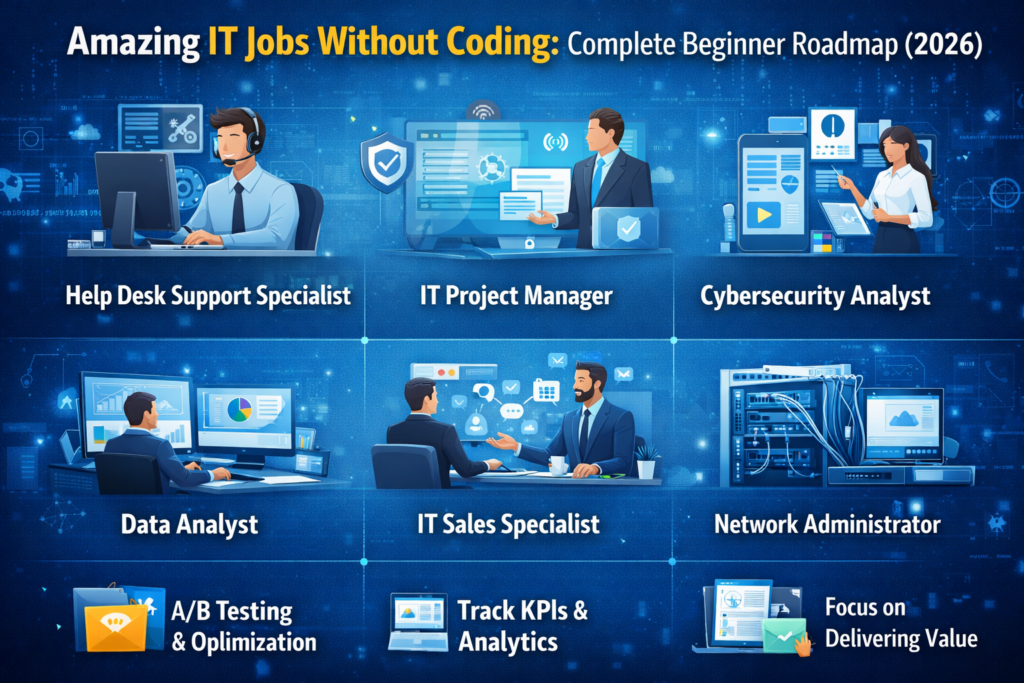
non coding it jobs for Beginners
Here are some of the most promising non coding IT jobs that beginners can target, along with the core skills required:
1. IT Project Manager
IT Project Managers are the orchestrators of technology initiatives. They plan, execute, and close projects, ensuring delivery on time, within budget, and within scope. Strong organizational, communication, and leadership skills are essential.
Beginner Example:
A student intern at Login360 helps track progress for a website development project using Trello or Jira, updating task statuses and coordinating with designers and developers.
Common Challenge:
Managing miscommunication between team members (e.g., developers misunderstanding client requirements).
Entry-Level Tools/Methods:
- Trello / Jira
- Agile methodology (Scrum basics)
- Gantt charts (via MS Project or ClickUp)
Success Story:
A beginner successfully organizes daily stand-up meetings, improving team clarity and reducing project delays.
2. Business Analyst (BA)
Business Analysts bridge the gap between business needs and technical solutions. They gather and document requirements clearly so developers can build the right product.
Beginner Example:
A student conducts simple requirement-gathering sessions for a college project, then documents user needs in a Google Docs BRD (Business Requirement Document).
Common Challenge:
Understanding vague client requirements and converting them into clear, actionable tasks.
Entry-Level Tools/Methods:
- Microsoft Excel / Google Sheets
- Lucidchart (for flow diagrams)
- User stories (Agile framework)
Success Story:
A student creates clear user stories that help developers avoid rework, saving time and effort.
3. Quality Assurance (QA) Engineer / Tester
QA Engineers ensure software works correctly by testing it thoroughly and reporting bugs.
Beginner Example:
A beginner tests a login page by checking scenarios like wrong password, empty fields, etc., and logs bugs in Jira or Bugzilla.
Common Challenge:
Missing edge cases during testing due to lack of experience.
Entry-Level Tools/Methods:
- Manual testing techniques
- Test case writing (Excel)
- Bug tracking tools (Jira, Bugzilla)
Success Story:
A student identifies a critical login bug before deployment, preventing user complaints.
4. UI/UX Designer
UI/UX Designers create user-friendly and visually appealing digital experiences. UI focuses on design; UX focuses on user journey.
Beginner Example:
A student designs a mobile app interface in Figma, creating wireframes for a food delivery app.
Common Challenge:
Balancing creativity with usability (designing something attractive but also functional).
Entry-Level Tools/Methods:
- Figma / Adobe XD
- Wireframing and prototyping
- Basic UX research (user personas)
Success Story:
A student redesigns a cluttered interface into a clean layout, improving usability in a demo project.
5. Cybersecurity Analyst (Entry-Level)
Cybersecurity Analysts protect systems by monitoring threats and responding to security incidents.
Beginner Example:
A student learns to monitor alerts in a simulated SOC environment and identifies suspicious login attempts.
Common Challenge:
Understanding complex security logs and distinguishing real threats from false alarms.
Entry-Level Tools/Methods:
- SIEM tools (like Splunk basics)
- Network monitoring basics
- Cybersecurity fundamentals (CIA triad)
Success Story:
A beginner detects unusual activity in a mock system and reports it correctly, demonstrating strong analytical skills.
6. Technical Support Specialist
Technical Support Specialists help users solve technical issues and ensure smooth system usage.
Beginner Example:
A student helps classmates troubleshoot software installation issues or fix login problems.
Common Challenge:
Handling frustrated users while staying patient and professional.
Entry-Level Tools/Methods:
- Ticketing systems (Zendesk, Freshdesk)
- Basic troubleshooting steps
- Remote support tools (AnyDesk, TeamViewer)
Success Story:
A student resolves multiple user issues efficiently, gaining confidence and communication skills.
Essential Skills for Success in Non Coding IT Jobs Roles
- 1. Communication: The ability to translate complex technical concepts into clear, actionable insights for non-technical stakeholders.
- 2. Problem-Solving: Identifying issues, analyzing root causes, and implementing effective, practical solutions within business and technical constraints.
- 3. Critical Thinking: Evaluating information objectively, questioning assumptions, and making informed decisions based on data and context.
- 4. Adaptability: Quickly learning new tools, processes, and technologies in a rapidly evolving IT landscape.
- 5. Collaboration: Working effectively across cross-functional teams, including developers, designers, business analysts, and stakeholders.
- 6. Project Management Fundamentals: Understanding timelines, resource allocation, risk management, and deliverables to ensure successful project execution.
Crafting Your Beginner Roadmap to Non Coding IT Jobs Success in 2026
Step 1: Self-Assessment and Research (Go Beyond Guesswork)
Don’t just “think” about your strengths—test and validate them:
- Use tools like 16Personalities or StrengthsFinder to identify traits (analytical, creative, detail-oriented).
- Try mini task experiments:
- Organize a small event → test project management fit
- Review an app and note bugs → test QA interest
- Redesign a simple website layout → test UI/UX skills
- Research roles using:
- LinkedIn job descriptions
- YouTube “day in the life” videos for roles like QA Analyst, Business Analyst, UI/UX Designer
Step 2: Skill Development and Training (Be Strategic, Not Random)
Instead of jumping into generic courses, follow a skill-gap approach:
How to do it:
- Pick a role (e.g., QA Analyst)
- Check 10 job listings
- List common skills (e.g., test cases, Jira, SDLC)
- Learn ONLY those skills first
How Login360 stands out:
If you’re considering Login360 (Chennai-based training institute), here’s how to use it effectively:
- Their programs focus on:
- Live project simulations (not just theory)
- Tool-based training (e.g., Jira, Figma, Excel dashboards)
- Scenario-based learning (real workplace problems like handling client requirements or bug reports)
- Ask them specifically:
- “Will I build a portfolio project during training?”
- “Do you include mock interviews with real HR questions?”
- Take advantage of affordability by:
- Combining 1 main course + 1 short specialization (e.g., QA + basic SQL)
Step 3: Certifications and Portfolio Building (Proof > Claims)
Certifications (Choose wisely):
- QA → ISTQB
- Project Management → Project Management Institute (PMP/CAPM)
- Cybersecurity → CompTIA (Security+)
Portfolio (THIS is your game-changer):
- UI/UX:
- Use Figma to create 3 case studies:
- App redesign (e.g., food delivery app)
- Landing page UI
- User journey flow
- Use Figma to create 3 case studies:
- QA:
- Create:
- Sample bug reports
- Test cases for a website
- Test plan document
- Create:
- Business Analyst:
- Requirement documents (BRD/FRD)
- Process flow diagrams
- Host your work on:
- Notion (clean portfolio pages)
- GitHub (even for non-coding documentation)
Step 4: Networking and Mentorship (Be Visible, Not Passive)
Where to network:
- Online:
- LinkedIn groups (search: “QA Testing India”, “UI UX Designers India”)
- Reddit communities (r/ITCareerQuestions, r/UXDesign)
- Local (Chennai):
- Meetup groups via Meetup
- Tech events at places like:
- Tidel Park
- IIT Madras Research Park
Smart outreach strategy:
- Don’t say: “Give me a job”
- Say: “Hi, I’m learning QA testing and built a sample project. Could you review it or guide me on improving it?”
- Send 5–10 personalized messages daily
Step 5: Job Search and Interview Preparation (Play Smart, Not Hard)
Resume strategy:
- Use skill-based resumes instead of experience-based
- Add:
- Projects (VERY important)
- Tools you used (Jira, Figma, Excel)
- Certifications
Where to apply:
- **LinkedIn Jobs
- Naukri
- Company career pages
Interview prep:
- Practice:
- “Explain your project” (most asked question)
- Scenario questions:
- “How would you handle a missed deadline?”
- “How do you find bugs in a system?”
- Use mock interviews via:
- Peers
- Mentors
- Training institutes
Common Mistakes to Avoid as a Beginner
Starting a career in non coding IT jobs roles can be exciting, but beginners often make avoidable mistakes that slow down their progress. One common mistake is jumping into a career path without proper research or self-assessment. Choosing a role that doesn’t match your strengths or interests can lead to frustration later.
Another frequent issue is focusing only on theory without gaining practical experience. Many beginners complete courses but fail to work on real-world projects or build a portfolio, which is crucial for roles like QA, UI/UX, or Business Analysis. Similarly, ignoring soft skills such as communication, problem-solving, and teamwork can limit your chances, as these are highly valued in non coding IT jobs.
Some learners also try to learn everything at once instead of focusing on one clear path, which leads to confusion and burnout. Additionally, skipping certifications or not updating resumes and LinkedIn profiles can reduce job opportunities.
Finally, lack of networking and not preparing properly for interviews are major setbacks. Connecting with professionals, seeking mentorship, and practicing interview questions can significantly improve your chances of landing your first non coding IT jobs.
Avoiding these common mistakes will help you stay focused, build confidence, and successfully start your journey in the non coding IT jobs.
The Login360 Advantage: Your Partner in Chennai’s IT Non coding Jobs Journey
At Login360, we understand the aspirations of beginners looking to break into the IT sector and we back our promise with proven results. Over the past three years, 85% of our students have successfully transitioned into IT roles within six months of course completion, with many securing positions as Business Analysts, QA Engineers, and IT Project Managers in leading companies.
Conclusion:
The landscape of non coding IT jobs is broad and welcoming, extending far beyond the realm of coding. For those with a passion for problem-solving, organization, design, or strategic thinking, non coding IT jobs offer incredibly fulfilling and stable career paths in 2026 and beyond. By following a structured roadmap, investing in targeted skill development, and leveraging resources like Login360’s affordable training programs in Chennai, beginners can confidently navigate their way into these high-growth sectors. The future of non coding IT jobs is inclusive, and your journey into it can start today, no coding required.