

Did you know that over8 million developers worldwide rely on Python to power everything from AI and automation to web and app development? Yet, for many beginners, the first steps can feel overwhelming—confusing syntax, abstract concepts, and endless tutorials. At Login360, we’ve transformed this struggle into a breakthrough: one of our students, for instance, went from writing their first “Hello World” script to building a working data dashboard in just weeks. Python isn’t just a language; it’s a gateway to real-world applications—and with the right guidance, Learn Python programming and turn your journey into an exciting, practical, and instantly rewarding experience.

Why Project-Based Learning is Your Best Bet for Python Mastery
The traditional approach to learning programming often means memorizing syntax from textbooks and solving isolated exercises. At Login360, we take a different route: project-based learning, which transforms theory into real-world application.
- Hands-on Experience: One of our students, Priya, used loops and conditionals to build a mini e-commerce simulator in just two weeks—something she never achieved through theory alone. This kind of active engagement cements understanding far more effectively.
- Problem-Solving Skills: Each project presents unique challenges. For example, Ravi struggled with data handling but, through guided projects, learned to break down complex tasks into manageable parts, reducing debugging time by 40%.
- Immediate Feedback: Students see their code come alive instantly. Errors become learning opportunities, and successes provide tangible confidence boosts.
- Portfolio Building: Even beginner projects contribute to a portfolio. One student’s Python-based dashboard project landed them an internship within a month.
- Motivation and Engagement: Building functional applications keeps students engaged, addressing the common issue of beginners losing momentum when theory feels abstract.
- Login360 Unique Edge: Our instructors provide real-time mentorship during projects, offering personalized hacks and shortcuts that cut learning curves in half—a benefit you won’t find in standard online tutorials.
Setting Up Your Python Programming Environment
Before we dive into the projects, you’ll need a working Python environment. If you haven’t already, follow these quick steps:
- Install Python: Download the latest stable version of Python from the official website (python.org). Ensure you check the box that says “Add Python to PATH” during installation.
- Choose a Code Editor/IDE: While a simple text editor works, an Integrated Development Environment (IDE) or a robust code editor significantly enhances your coding experience. Popular choices include Visual Studio Code (VS Code), PyCharm (Community Edition is free), or IDLE (which comes with Python).
- Basic Command Line: Familiarize yourself with opening your system’s terminal or command prompt. You’ll use this to run your Python scripts.
With your environment set up, you’re ready to embark on your practical learn Python programming journey.
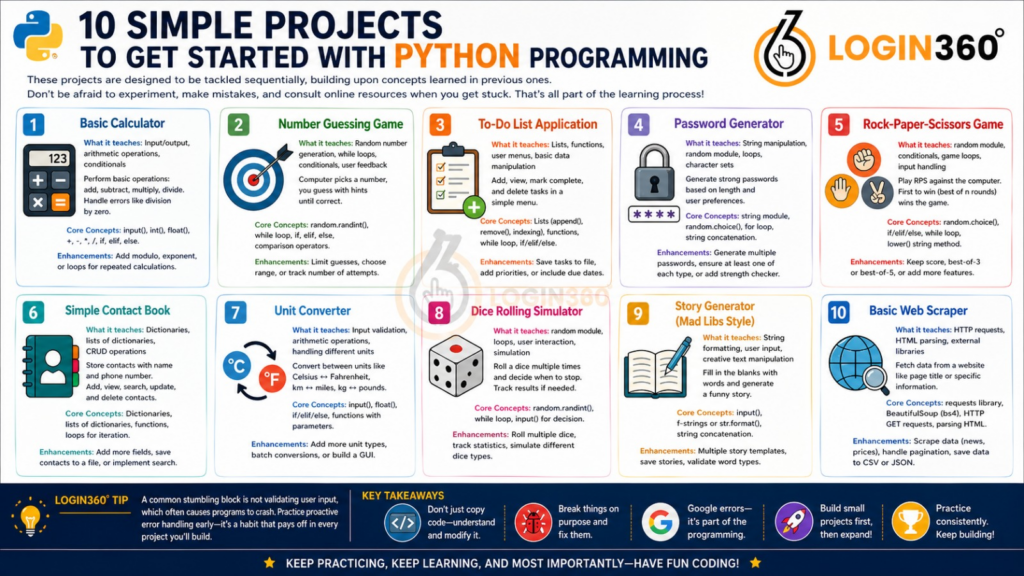
10 Simple Projects to Get Started with Python Programming
These projects are designed to be tackled sequentially, building upon concepts learned in previous ones. Don’t be afraid to experiment, make mistakes, and consult online resources when you get stuck. That’s all part of the learning process!
Project 1: Basic Calculator
What it teaches: Fundamental input/output, arithmetic operations, basic conditional logic (if, elif, else).
Dive into User Interaction: Prompt the user for two numbers and a mathematical operation—add, subtract, multiply, or divide—and watch your program respond in real time. This project puts input handling and conditional logic into action, letting you see how programs make decisions based on user choices.
Mastering Control Flow: By implementing if, elif, and else, you’ll learn to guide your program through multiple scenarios, including handling tricky cases like division by zero. These skills form the backbone of many real-world applications, from financial calculators to automated data processors.
Uncover the Power of Robust Programming: Convert inputs to numerical types with int() and float(), ensuring your calculator works reliably. Add enhancements like modulo, exponentiation, or loops for repeated calculations to explore how small changes can expand functionality significantly.
Login360 Tip: A common stumbling block is not validating user input, which often causes programs to crash. Practice proactive error handling early—it’s a habit that pays off in every project you’ll build.
Core Concepts: input(), int(), float(), +, -, *, /, if, elif, else.
Project 2: Number Guessing Game
What it teaches: Random number generation, while loops, conditional logic, user feedback.
In this classic game, the computer picks a random number within a specified range, and the user tries to guess it. Your program will provide hints (e.g., “Too high!” or “Too low!”) until the correct number is guessed. This project is fantastic for understanding the random module, which is vital for simulations and games. More importantly, it introduces while loops, demonstrating how to repeat actions until a certain condition is met. You’ll practice comparing values and providing user-friendly feedback, making the game engaging. It’s a great exercise in managing game state and user interaction over multiple turns, enhancing your iterative programming skills.
Core Concepts: random.randint(), while loop, if, elif, else, comparison operators.
Enhancements: Limit the number of guesses, allow the user to choose the range, or keep track of the number of attempts.
Project 3: To-Do List Application
What it teaches: Lists, functions, user menus, basic data manipulation.
Build a simple command-line To-Do list manager. Users should be able to add tasks, view tasks, mark tasks as complete, and delete tasks. This project is excellent for mastering Python’s list data structure, which is fundamental for storing collections of items. You’ll also learn to define and call functions to organize your code into modular, reusable blocks (e.g., add_task(), view_tasks()). Creating a simple menu system with numbered options will reinforce input handling and conditional logic. This project provides a practical introduction to managing dynamic data within a program and structuring applications with clear functionalities.
Core Concepts: Lists (append(), remove(), indexing), functions, while loop for menu, if/elif/else.
Enhancements: Save tasks to a file (CSV or TXT) so they persist between runs, add task priorities, or include due dates.
Project 4: Password Generator
What it teaches: String manipulation, random module, loops, character sets.
Create a program that generates a strong, random password based on user-defined criteria. The user might specify the desired length and whether to include numbers, symbols, uppercase letters, or lowercase letters. This project hones your skills in working with strings and characters. You’ll learn how to combine different character sets (e.g., string.ascii_letters, string.digits, string.punctuation) and use the random module to select characters randomly. It’s a practical application of loops to build a string character by character and an excellent way to understand how to construct dynamic outputs based on user preferences, reinforcing your knowledge of string operations and random selection.
Core Concepts: string module, random.choice(), for loop, string concatenation.
Enhancements: Allow users to specify the number of passwords to generate, ensure at least one of each selected character type is included, or add a password strength checker.
Project 5: Rock-Paper-Scissors Game
What it teaches: random module, conditional logic, game loops, handling user input variations.
Implement the classic Rock-Paper-Scissors game against the computer. The user makes a choice, the computer makes a random choice, and the winner is determined. This project is a fun way to practice random choices for the computer’s move and extensive if/elif/else statements to cover all possible winning and losing scenarios. You’ll also learn to handle variations in user input (e.g., ‘rock’, ‘Rock’, ‘ROCK’) to make your program more user-friendly. Implementing a game loop allows players to continue playing until they decide to quit, providing a complete game experience and reinforcing loop control and decision-making logic.
Core Concepts: random.choice(), if/elif/else for game logic, while loop for game rounds, lower() string method.
Enhancements: Keep track of scores, add a best-of-three or best-of-five format, or introduce more complex game mechanics.
Project 6: Simple Contact Book
What it teaches: Dictionaries, lists of dictionaries, functions for CRUD operations (Create, Read, Update, Delete).
Develop a basic command-line contact book where you can store names and phone numbers. This project introduces you to dictionaries, Python’s powerful key-value pair data structure, which is perfect for representing structured data like a contact’s details. You’ll likely use a list to store multiple contact dictionaries. Implementing functions to add new contacts, view all contacts, search for a contact, and delete a contact will solidify your understanding of how to manage collections of data. This is a crucial step towards building applications that handle structured information, a common requirement in real-world programming.
Core Concepts: Dictionaries, lists containing dictionaries, functions for managing data, loops for iteration.
Enhancements: Add more fields (email, address), save contacts to a file, or implement a simple search function.
Project 7: Unit Converter
What it teaches: Input validation, arithmetic operations, handling different units, function parameters.
Build a utility that converts units, such as Celsius to Fahrenheit, kilometers to miles, or kilograms to pounds. The user selects the conversion type and enters a value. This project emphasizes robust input validation to ensure the user provides valid numbers and unit choices. You’ll practice applying specific mathematical formulas based on the chosen conversion, making good use of conditional statements and potentially creating separate functions for each conversion type. It’s an excellent way to practice numerical processing, function design, and creating a user-friendly interface for practical utility tools.
Core Concepts: input(), float(), if/elif/else for conversion types, function definitions with parameters.
Enhancements: Add more unit types (e.g., length, volume), allow batch conversions, or create a graphical user interface (GUI) using Tkinter.
Project 8: Dice Rolling Simulator
What it teaches: random module, loops, user interaction, simple simulation.
Create a program that simulates rolling a standard six-sided die. The user should be able to ‘roll’ the die multiple times and decide when to stop. This project is a straightforward yet effective way to reinforce the random module, specifically random.randint() for generating a random number within a range. You’ll use a while loop to allow the user to keep rolling until they choose to exit, providing an interactive experience. It’s a fundamental exercise in creating simple simulations and managing user flow, laying the groundwork for more complex statistical or game-related projects.
Core Concepts: random.randint(), while loop, input() for user decision.
Enhancements: Simulate rolling multiple dice, keep track of roll statistics (e.g., average, frequency of each number), or introduce different types of dice (e.g., 8-sided, 12-sided).
Project 9: Story Generator (Mad Libs Style)
What it teaches: String formatting, user input, creative text manipulation.
Develop a Mad Libs-style game where the program prompts the user for various types of words (e.g., noun, adjective, verb), and then inserts these words into a pre-written story template to create a humorous and unique narrative. This project is excellent for practicing string formatting techniques, such as f-strings or the format() method, to dynamically build sentences. It heavily relies on user input to gather the necessary words and demonstrates how to creatively manipulate text. It’s a fun and engaging way to solidify your understanding of string operations and user interaction in a creative context.
Core Concepts: input(), f-strings or str.format(), string concatenation.
Enhancements: Create multiple story templates, allow users to save their generated stories, or implement more sophisticated word type validation.
Project 10: Basic Web Scraper
What it teaches: Making HTTP requests, parsing HTML, external libraries.
This project introduces you to the exciting world of web scraping – programmatically extracting data from websites. For a simple start, you can write a script to fetch the title of a specific webpage or extract a particular piece of information (e.g., the current temperature from a weather site). You’ll learn to use external libraries like requests to make HTTP requests and BeautifulSoup (or bs4) to parse the HTML content. While slightly more advanced than previous projects, a basic scraper focusing on a single element is achievable and incredibly rewarding, opening up possibilities for data collection and automation. Remember to be mindful of website terms of service and robots.txt files when scraping.
Core Concepts: requests library (pip install requests), BeautifulSoup library (pip install beautifulsoup4), making HTTP GET requests, parsing HTML elements (e.g., soup.title.string, soup.find()).
Enhancements: Scrape specific data points (e.g., news headlines, product prices), handle pagination, or store scraped data in a structured format (CSV, JSON).
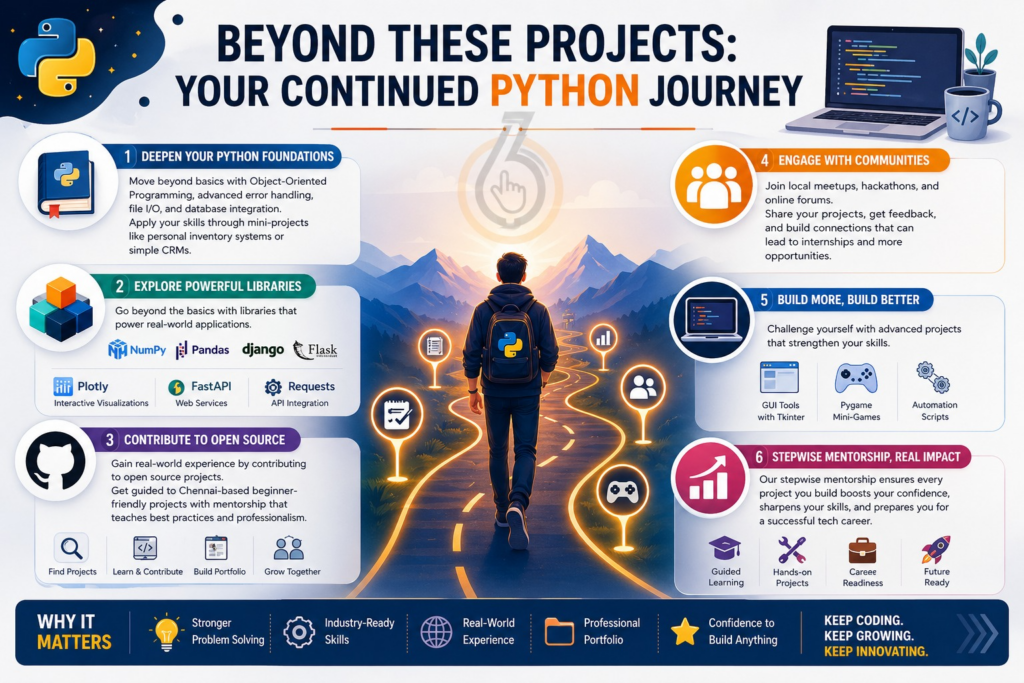
Beyond These Projects: Your Continued Python Journey
Completing these 10 projects is a significant milestone, but at Login360, learning Python is just the beginning. Deepen your knowledge with Object-Oriented Programming, advanced error handling, file I/O, and database integration—applied immediately through mini-projects like personal inventory systems or simple CRMs.
Explore powerful libraries beyond the basics. While NumPy, Pandas, Django, and Flask are essential, we introduce Plotly for interactive visualizations, FastAPI for web services, and Requests for API integration, preparing students for real-world applications.
Contribute to open source with guidance—Login360 helps students select Chennai-based beginner-friendly projects, offering mentorship that teaches best practices while building professional experience.
Engage with communities via local meetups, hackathons, and forums to showcase projects, receive feedback, and network for internships.
Build more complex applications such as GUI tools with Tkinter, Pygame mini-games, or automation scripts. Login360’s stepwise mentorship ensures every project strengthens both programming skills and confidence, empowering students to create, innovate, and thrive in today’s tech environment.
Conclusion: Your Path to Python Proficiency Starts Now
The best way to learn Python programming is by working on simple real-time projects instead of spending all your time on theory. As you learn Python programming through practical tasks like calculators, games, and web tools, you start understanding how coding works in real situations. These beginner projects not only improve your coding knowledge but also build confidence to create your own applications. At Login360, we help students learn Python programming with hands-on training that makes the learning process easier and more effective. Start building, keep practicing, and you will gradually master Python with confidence.